To post one video to TikTok, Instagram Reels and YouTube Shorts: export a clean 1080×1920 file with no watermark, keep text away from the bottom and right edges, write a separate caption for each platform, and upload the file to each one yourself rather than reposting a download. Same video, three audiences, three chances to go viral.
Most people who cross-post do it the lazy way: download the TikTok, watermark and all, and drop it into Instagram. It's the one way of doing this that the platforms say they push down.
Why post the same short everywhere
Because an idea can die on one platform and fly on another, and you can't tell which in advance.
The audiences barely overlap. A viewer who scrolls Reels at night often has no TikTok at all, and YouTube Shorts reaches people who opened YouTube for something else. Posting once to each is three tries for the work of one video.
Our own numbers make the case. Three of our shorts reached 16.4 million views on Instagram in a week. The same files on other platforms did a fraction of that. Had we posted only where we expected them to do best, we'd have missed the biggest result we've had.
Step 1: Export a clean file
The file everything else depends on:
- 1080×1920, vertical 9:16.
- No watermark from another app. Instagram said back in 2021 that Reels carrying another platform's logo are made less discoverable, and in 2025 it said it would favour original posts over reposted copies.
- H.264 MP4, 30 fps. All three accept it without re-encoding into mush.
If you download a video back from TikTok to reuse it, it comes with the TikTok logo and a compressed picture. Always post from your original file.
What goes wrong: exporting once at 1080×1080 "to fit everywhere". A square video plays with bars in all three feeds and looks like a repost.
Step 2: Check the safe zone
Each app lays its buttons over your video: likes and shares down the right edge, the caption and your name across the bottom. The exact spots differ by app and by phone, so design for the worst case:
- Keep words and faces out of the bottom fifth of the frame.
- Keep them out of a strip about a tenth of the width down the right edge.
- Leave a little room at the top, where TikTok puts its tabs.
One layout that respects all three is simpler than three layouts, and you'll never have a punchline hidden under the share button.
Step 3: Make a cut per platform when length matters
One file is fine for most shorts. The exception is length:
| TikTok | Instagram Reels | YouTube Shorts | |
|---|---|---|---|
| Longest video | 10 minutes in the app (longer from a computer) | 3 minutes | 3 minutes |
| Pays per view | Creator Rewards, videos over 1 minute | No general per-view pay | Ad revenue share, any Short |
| Best length to start with | 15 seconds, or 1:05 for payouts | 10 to 20 seconds | 15 to 30 seconds |
TikTok's Creator Rewards only pays for videos longer than a minute, so if a story stretches to 65 seconds without dragging, make a slower TikTok cut. The numbers per platform are in how much TikTok, Shorts and Reels pay.
FramePillar makes two cuts of every video: a TikTok cut (for TikTok and YouTube Shorts) and a Reel cut (for Instagram and Facebook), plus a cover.
Step 4: Write three captions, not one
The video can be the same. The words around it shouldn't be.
- TikTok: the caption is searched. Write what the video is about in the words someone would type ("when your cat pretends it didn't miss you"), then three to five hashtags that describe it. Pick a cover frame with readable text.
- Instagram: short and personal, a line that makes someone tag a friend. Keep it as short as the TikTok one; long captions don't help a Reel.
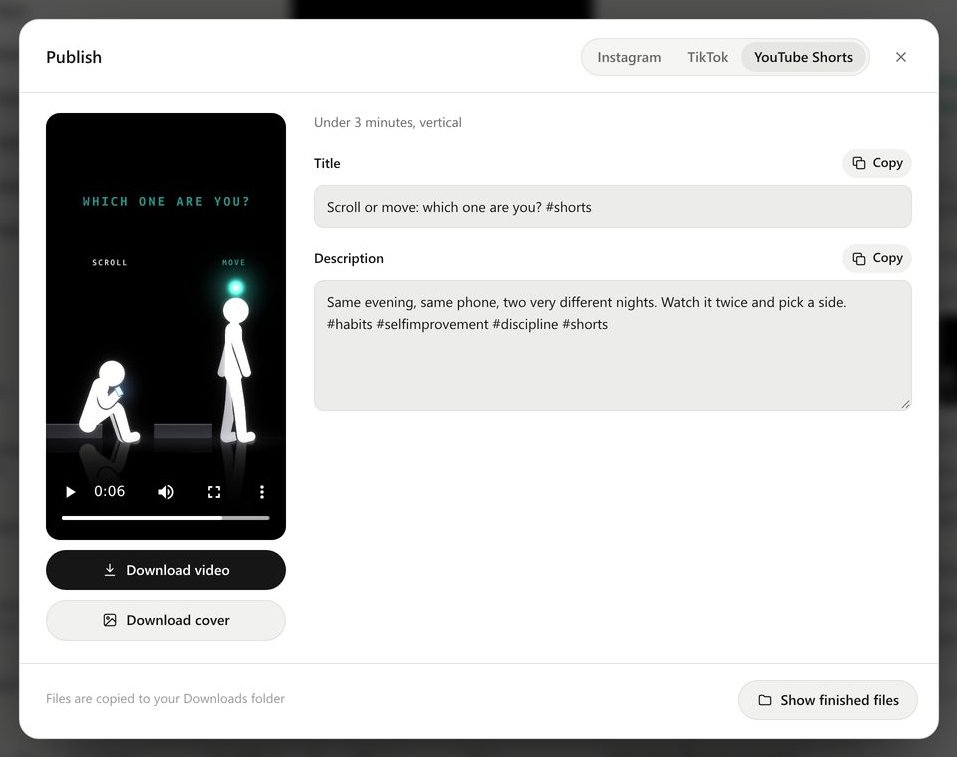
- YouTube Shorts: a title under 60 characters that reads like a search, and a one-line description. You no longer need #Shorts; any vertical video up to 3 minutes counts as a Short.
In FramePillar, open Publish, pick the tab for each platform and click Copy next to its caption. The export lesson walks through it.
Step 5: Post in a set order
We post to all three within the same hour, so the same idea gets a fair start everywhere and we can compare them the next day. If you'd rather stagger it, post first where your audience is biggest. There's no penalty for posting the same video to different platforms on the same day.
On Instagram, a professional account can post a short as a trial reel: it's shown only to people who don't follow you, and you choose whether to share it with your followers after you see how it does. Useful for ideas you're unsure of.
What goes wrong: scheduling everything through a tool that posts a lower-quality copy. Check the first few posts on your phone; if the picture looks softer than your file, upload by hand.
Step 6: Compare after 24 hours
Write down, for each platform, two numbers per short: how much of it people watched, and how many shared it. After ten shorts you'll know which platform likes your channel, and whether a specific kind of idea does better on one. Make the next five ideas for the winner, and keep posting everywhere anyway.
Questions
Can I post the same video on TikTok and Instagram?
Yes. Neither platform forbids it. Upload your original file to each, without the other app's watermark, and write a caption for each.
Does reposting TikToks to YouTube Shorts hurt the channel?
Not if it's your own video and a clean file. What YouTube refuses to pay for is reused content: other people's clips with nothing added. Read what YouTube's rules say.
Should I post to Facebook too?
If you have a Page, yes: the Reel cut works there as it is. It's one more audience for the same file.
What's the best time to post?
The hour your followers are online, which each app shows in its analytics once you have some. Until then, posting every day matters more than the hour. Our guide to starting a faceless channel has a 30-day plan.